Cannot run Arkio simultaneously on multiple Quests
Written By Johan Hanegraaf
Last updated 8 months ago
Running the same app on multiple Quest headsets using the same Meta account can result in an issue where the headsets will show a warning, “Already playing this game on a different headset” or "multiple devices can’t access this app at the same time"
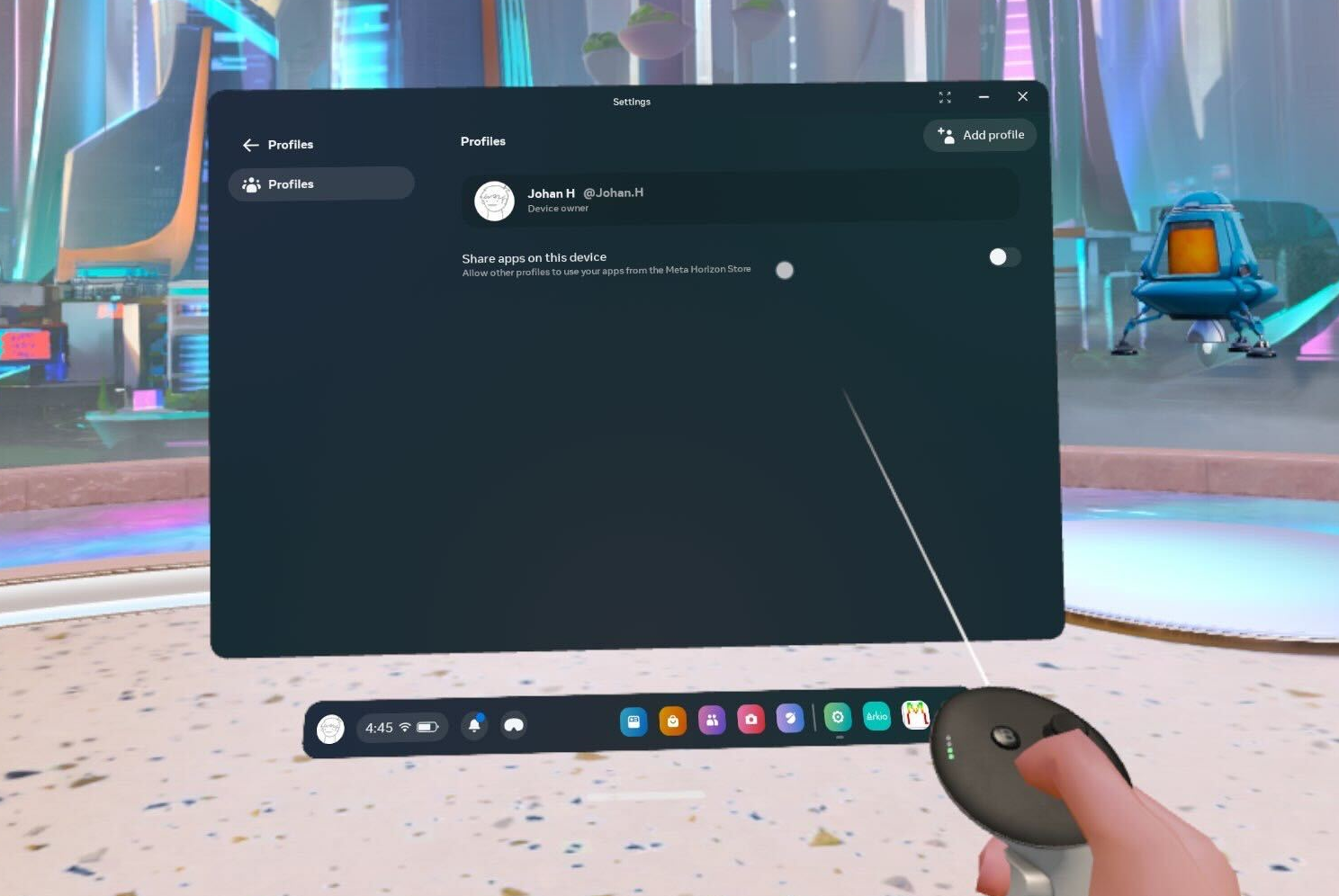
This is a known issue with Meta Store apps that use the "App sharing" feature. When "App sharing" is enabled on any of your logged-in devices, it prevents your apps from running simultaneously on other headsets logged in to the same account. You can work around this by disabling "App Sharing" from all your devices in Settings>Profiles
Disabling the app-sharing feature or removing guest meta accounts from your headset allows Quest Store apps to run simultaneously on as many devices logged in to the same Meta account as you like.
If any Meta Quest devices have a social profile set to online and the Arkio app is shared, this can also result in the issue, and it can be fixed by setting the social profile status to offline.
An alternative is to use Meta for Business to manage multiple headsets or log in to the headsets from different Meta accounts. (see Quest deployments of Arkio)
If you have questions about this, you can best contact Meta's customer support. They should be able to help you with other account or app store limitations you might be experiencing.
Was this helpful?
Still need help? Ask the team