Choose your AI model, reasoning, and speed
Written By Johan Hanegraaf
Last updated About 4 hours ago
Arkio lets you choose the AI model you work with and adjust its reasoning level and speed. These settings help you balance design capability, response time, and AI credit usage.
How to change your settings
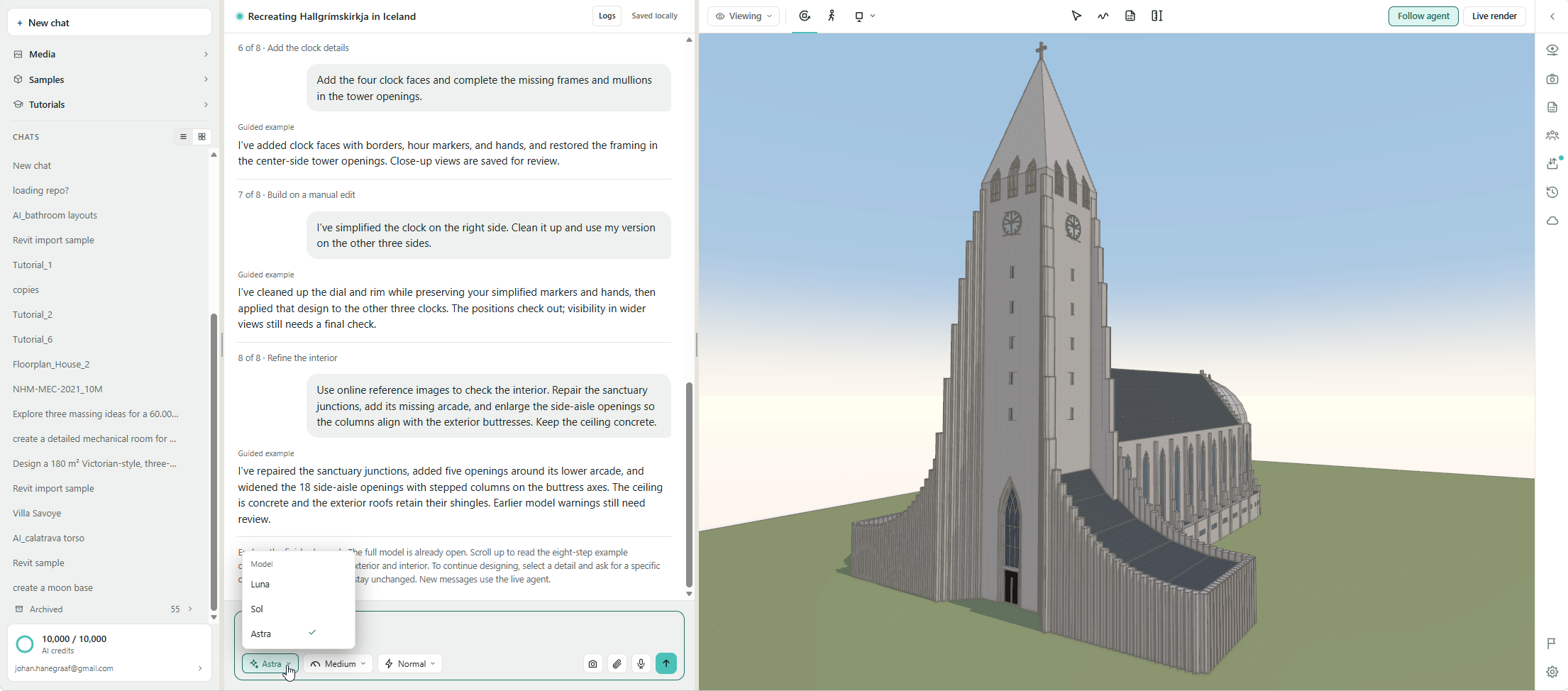
Open the AI model selector and choose Astra, Sol, or Luna.
Choose a reasoning level to control how much effort the model spends working through your request.
Choose a speed. Normal uses fewer credits; faster options increase credit usage.
Which model should I use?
For example, choose Astra to develop a furnished interior from a floor plan, Sol to make general changes to a design, and Luna to explore simple building volumes or move around a scene.
Choosing a reasoning level
Higher reasoning levels generally consume more AI credits.
With Astra, Low or Medium reasoning is already capable of handling most design tasks. Use High, Extra High, or Max for your most demanding requests, such as interpreting complex references or coordinating many design constraints.
Start with a lower reasoning level and increase it when the task needs more careful problem-solving.
Choosing a speed
These are approximate comparisons; actual usage and completion time depend on the task.
Speed and reasoning serve different purposes: reasoning controls the effort spent on your request; speed controls how quickly that work is processed. Choosing Fast or Ultrafast does not replace choosing a more capable model or an appropriate reasoning level.
A good starting point
Use Astra with Low or Medium reasoning at Normal speed for design work. Try Sol for routine tasks to conserve credits, and Luna for basic massing or scene navigation.
Was this helpful?
Still need help? Ask the team